
Browser tools that respect your time
Reopen any closed tab
even from days ago.
Quick Reopen is a Chrome extension that brings instant search and extended history to your closed tabs.
Privacy-first: everything stays on your device.
🎁 Use code EARLY30 at checkout for 30% off — limited time.
Why Quick Reopen exists
Quick Reopen was the first extension built under Browseby — and the reason the studio exists.
The frustration was simple: I'd close a tab by accident, or come back to a research session a few days later, and Chrome's built-in "recently closed" list either didn't go far enough or required too many clicks.
Ctrl+Shift+T reopens tabs one at a time in reverse order.
Useful, but not when you closed something three days ago and can't even remember what it was called.
I wanted a way to search through closed tabs the same way you search through anything else — type a few characters, find what you need, reopen it.
That's what Quick Reopen does.
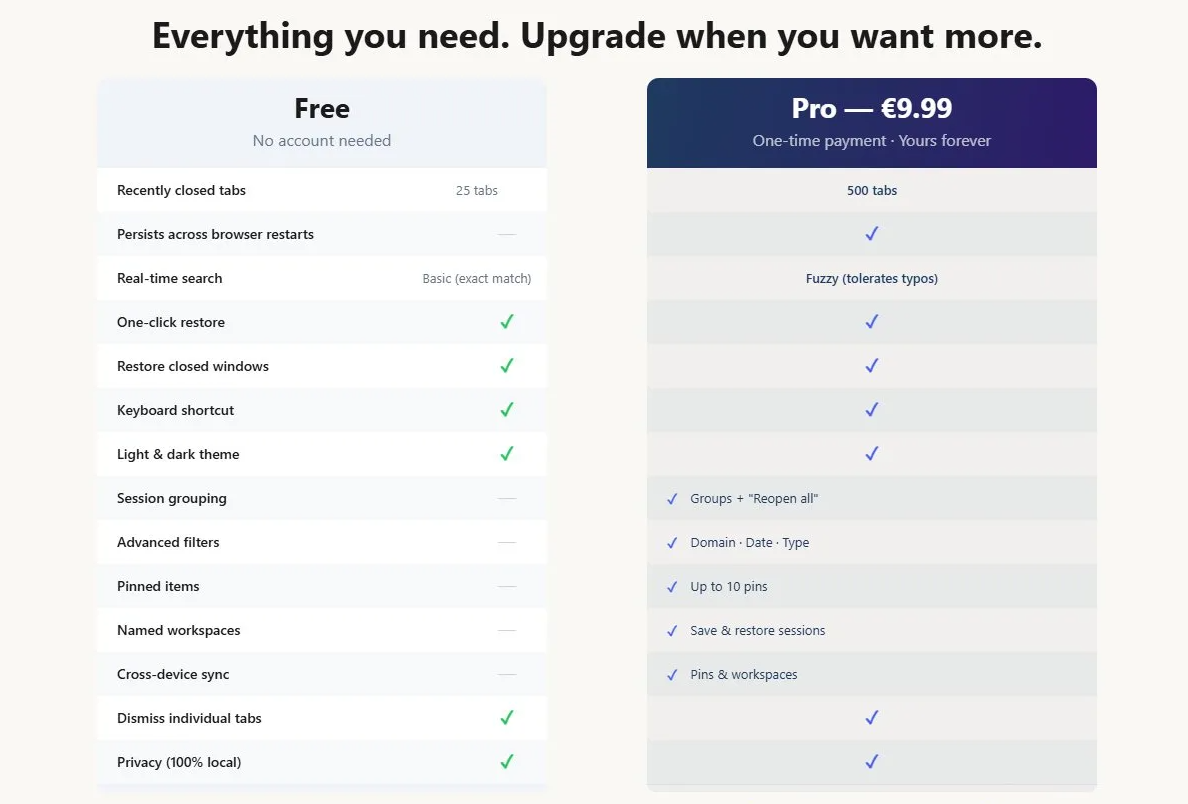
The extended history (Pro) keeps up to 500 tabs across sessions, so the tab you closed last Tuesday is still there when you need it.
Quick Reopen also set the foundation for everything Browseby builds:
local-first storage,
no accounts,
one-time payment,
lightweight code.
Principles that mattered to me as a user — and now matter for every Browseby tool.
Get notified when we launch new browser tools.
No spam. One email at launch. Unsubscribe anytime.
· Homepage · Contact Us · Privacy Policy · Terms of Service · Refund Policy
© 2026 Browseby